You open a new tab dozens of times a day and get a blank screen. MonoStart replaces it with a dashboard you set up yourself — your links, tasks, notes, and reminders, arranged how you want them. I built it as a Manifest V3 Chrome extension that runs entirely on your device.
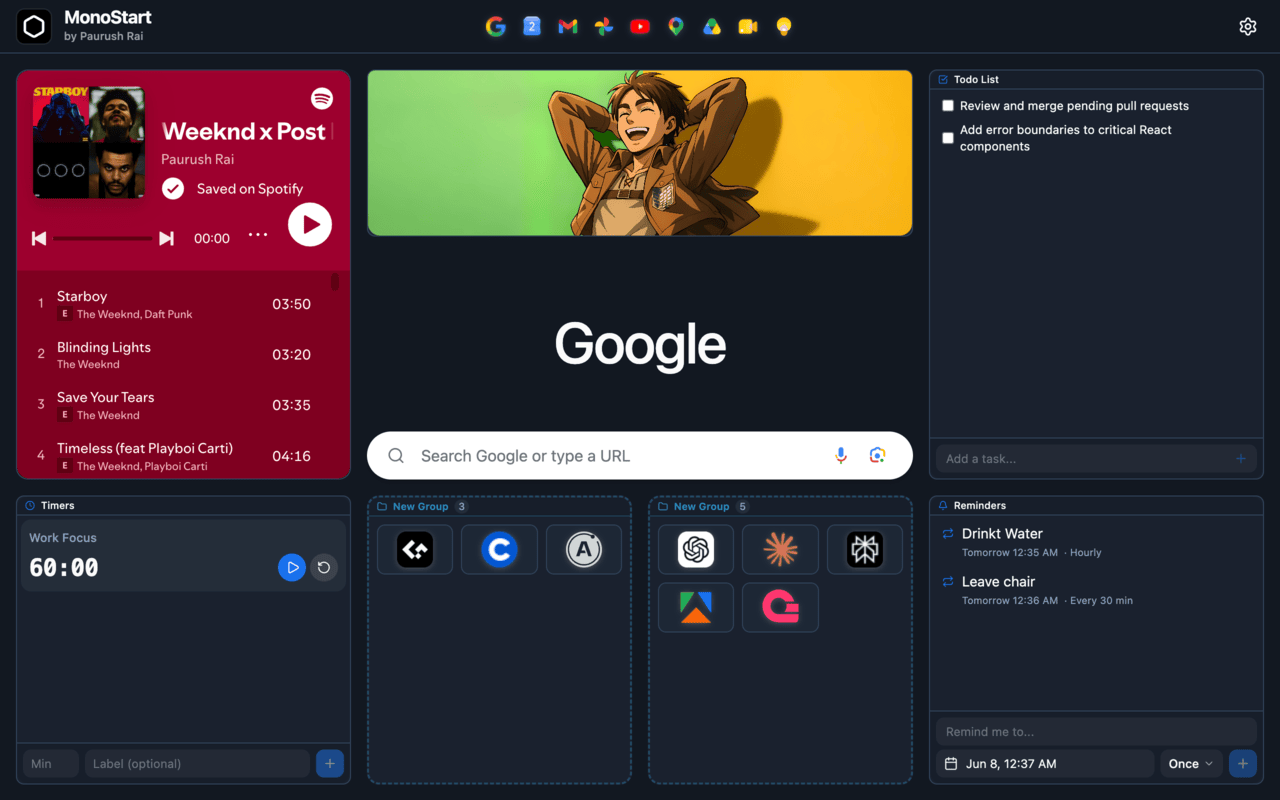
What I built
- A dashboard you arrange: A drag-and-drop grid where every widget — links, grouped folders, notes, to-dos, timers, reminders, images, embeds, and search — can be placed and resized to fit how you work.
- Everything one glance away: Quick links and folders instead of digging through bookmarks; notes, tasks, and reminders on the page you already open all day.
- Make it yours: 12 color themes, a custom-color picker, light/dark, and color, gradient, or image wallpapers.
- Timers and reminders: Built in, so you don't reach for a separate app to stay on track.
- Private by default: Everything lives on your device — no account, no servers, no tracking — and the page opens instantly.
Why it mattered
The new-tab page is the most-opened screen in the browser and usually does nothing. MonoStart turns it into a place that's actually useful, pulling links, tasks, notes, and reminders into one spot instead of scattering them across bookmarks, sticky notes, and other apps. It's a personal project and open source, so the code is there to read.